Bhoomi Online – View RTC (Pahani), Mojini, Mutation Status & Karnataka Land Records
Bhoomi is Karnataka’s official land records portal. Launched in 2000 by the state government, the Bhoomi online portal lets farmers and landowners access all their land records from home. Through Bhoomi’s portal you can view the Record of Rights, Tenancy & Crops (RTC or Pahani), check land mutation (ownership) history, get Khata extracts, download i-RTC (digitally signed RTC), and see village revenue maps. All these services are available online on Bhoomi, making it quick and easy to get land information without visiting offices. This transparency helps farmers verify ownership, apply for loans, and avoid fraud.
RTC stands for Record of Rights, Tenancy and Crops
Before diving into the portal, it’s essential to understand what you’re looking at. The RTC, also known as Form 16, is the single most important document for any landowner in Karnataka. It isn't just a receipt; it is a legal document that contains:
- Ownership Details: Information on who legally owns the land.
- Land Area: The exact measurements and plot numbers.
- Tenancy Rights: Details regarding who is cultivating the land if the owner is not.
- Crop Information: Records of the types of crops grown on the land.
- Liabilities: Any loans or charges against the land from banks or other institutions.
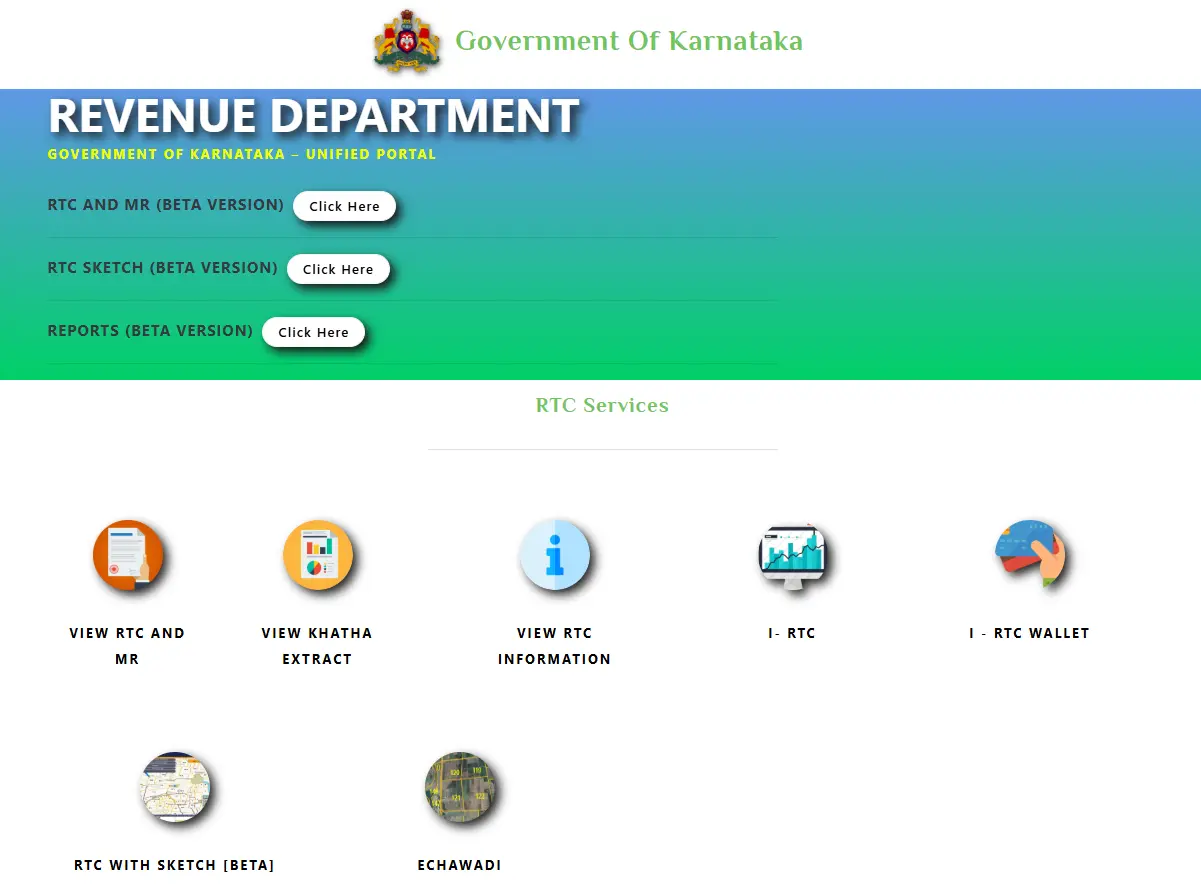
Key Features of the Bhoomi RTC Portal
Launched by the Karnataka government in 2000, the Bhoomi portal was a pioneer in Indian e-governance. It was designed to eliminate the "manual era" of land record management, which was often plagued by delays and errors.
Some of its standout features include:
- Digital Signatures: Since 2008, RTCs have been issued with Public Key Infrastructure (PKI), making them legally compliant with the IT Act of 2000.
- Real-time Mutation Tracking: You can monitor the status of ownership transfers (mutations) online.
- Integration with Other Systems: The portal is linked with the Kaveri (registration) and Mojini (survey) systems, ensuring that when you buy property, the records are updated seamlessly.
- Accessibility: With over 20 million land records digitized, the portal serves more than 4.11 crore owners across the state.
Bhoomi RTC - Online Viewing of Land Records in Karnataka
Key Bhoomi services for landowners include:
- View RTC (Pahani): See ownership, crops, and tenancy details of your land.
- Check Mutation (MR) Status & Extract: Track recent transfers of ownership and view the full mutation register.
- View Khata Extract: Access the local property tax register (Khata) details by Khata number or Survey number.
- Download i-RTC: Get a digitally signed legal copy of your RTC (needed for loans or court).
- View Revenue Maps: Download village survey maps to see land parcel boundaries.
Each of these Bhoomi services is explained below, with simple step-by-step instructions on how to use them via the Bhoomi portal.
View RTC (Pahani)
The RTC (Record of Rights, Tenancy and Crops), also called Pahani, is the official land record showing owner name, land type, area, soil, water rate, and crops. It is important for establishing ownership and applying for loans. On the Bhoomi portal you can view your RTC instantly:
- Step 1: Go to the Bhoomi portal at landrecords.karnataka.gov.in. From the homepage menu click “View RTC and MR” under RTC Services.
- Step 2: On the new page choose Current Year or Old Year, then select your District, Taluk, Hobli, Village and Survey Number.
- Step 3: Enter the Surnoc (subdivision) and Hissa (share) number, then click “Fetch Details”.
- Step 4: Your land record will appear. Click “View” next to the owner name to see the full RTC/Pahani page.
No fee is required just to view your RTC. (If you need an official signed copy for loans or legal use, see the i-RTC section below.)
Check Mutation Register & Status
Mutation means updating the land record when ownership changes (e.g. sale or inheritance). Bhoomi lets you see if a recent mutation is recorded (status) and view the full mutation extract (MR) for your land:
- Mutation Status: Go to “Mutation Status” on the Bhoomi portal. Select your District, Taluk, Hobli, Village and enter the Survey Number, Surnoc and Hissa. Click “Fetch Details”. The system will show the current status (Pending, Approved, etc.). If nothing is pending, it will say “No Mutation Pending”.
- Mutation Extract: To see the full history, click “Mutation Extract” on the portal. Enter District, Taluk, Hobli, Village, Survey No. and click “Fetch Details”. Select the mutation entry you want and click “Preview”. The detailed mutation extract (register) will appear.
Using these tools, you can track ownership changes and download the mutation extract for records.
View Khata Extract
The Khata is a land tax record for your property. To view Khata extract online:
- Visit Bhoomi’s homepage and click “View Khata Extract”.
- Choose whether to search by Khata Number or by Survey Number.
- Enter your District, Taluk, Hobli, Village, and Khata No. (or Survey No. depending on your choice).
- Click “Get Report”. The system will display your Khata extract details for the entered Khata.
This provides the official property tax record (assessee list, property address, etc.) for verification.
Download i-RTC (Digitally Signed RTC)
For official or legal purposes (loans, court), you may need a digitally signed RTC (called i-RTC). This certified copy includes a QR code and digital signature to prove authenticity. To get an i-RTC:
- Visit i-RTC Page: On the Bhoomi portal, select “i-RTC”. You may login or proceed as Guest. (As Guest you’ll enter your name, mobile, email and Aadhaar; or registered users log in with their Bhoomi ID.)
- Enter Land Details: Fill in your District, Taluk, Hobli, Village, Survey No., Surnoc, Hissa and RTC validity, then click “Fetch Details”.
- Pay and Download: When your RTC appears, click “View RTC” and then “Pay and Download”. A fee of ₹10 is charged for the certified copy. After payment, the signed RTC PDF will download.
Note: To download i-RTC, you must register on Bhoomi’s i-Wallet portal and add money (₹15 per copy). This payment is done through UPI, netbanking or credit card. Once paid, you can print the official RTC with the digital signature.
The i-RTC is a legal document equivalent to a certified land record, valid for loan applications and court use.
View Revenue Maps
Bhoomi provides Revenue Maps (village survey maps) to help visualize land plots. To download maps:
- From the Bhoomi portal homepage, go to Survey (SSLR) Services and click “Revenue Maps”.
- Select your District, Taluk, Hobli, and choose the type (Village Map, BBMP city map, lake map, etc.).
- A list of available maps will appear. Click the PDF icon next to the map you need.
- The full map PDF will download for you to view or print.
Revenue maps show boundaries of survey numbers and village layout, which helps identify the exact location and shape of your land. (Large maps may take a moment to download.)
Benefits of Bhoomi for Farmers
Bhoomi greatly improves transparency and access to land records. Farmers can quickly verify ownership, check crop details or liabilities, and get documents needed for bank loans—all online. Important benefits include:
- Convenience: Land records are accessible 24×7 from home or kiosks. No more long waits or travel to taluk offices.
- Transparency: Digitization prevents record tampering. Official data (RTC, mutation history) is instantly available, reducing disputes.
- Loan Support: Banks require RTC/Pahani for agriculture loans. With Bhoomi you can print or download the RTC/i-RTC instantly for loan applications.
- Verified Ownership: Easy checks of land details (owner, area, soil, water rate) and Khata confirm landholding, preventing fraud. Bhoomi’s real-time updates keep records accurate.
Overall, the Bhoomi portal makes Karnataka land records transparent, efficient, and farmer-friendly. By using Bhoomi online services, Karnataka farmers gain quick and reliable access to essential land documents for managing their property, applying for loans, or resolving land issues, all with a few simple clicks.
Bhoomi Service Fees & Charges (2026)
| Service / Document | Fee (Approx. ₹) |
|---|---|
| View RTC (Pahani) – informational copy | Free (no charge) |
| Dial-up i-RTC – digitally signed RTC download | ₹10–₹15 per copy |
| Mutation Status – view ownership change status | Free |
| Mutation Extract (MR) – certified mutation register | ₹15 per extract |
| Tippan / Survey Sketch – land sketch/report | ₹15 per extract |
Notes:
- Viewing basic land records on Bhoomi (such as RTC online and mutation status) is typically free, but obtaining a certified or digitally signed copy often carries a small, nominal government fee.
- i-RTC (official certified copy) is widely reported as costing around ₹10–₹15 per document, depending on the portal or payment gateway.
- These charges may be collected via the portal’s i-Wallet system or local kiosk centers.
- Fees are subject to periodic revision by the Karnataka Revenue Department, so always check the official portal for the most current rates.
What is the Dishaank App?
The Dishaank App is an official mobile application launched by the Government of Karnataka to help citizens and farmers identify land survey numbers and boundaries using GPS technology. It is developed by the Karnataka Remote Sensing Applications Centre (KSRSAC) and works in coordination with the Bhoomi land records system.
The app is especially useful for farmers and land buyers who want to verify the exact location and survey number of a land parcel on the ground.
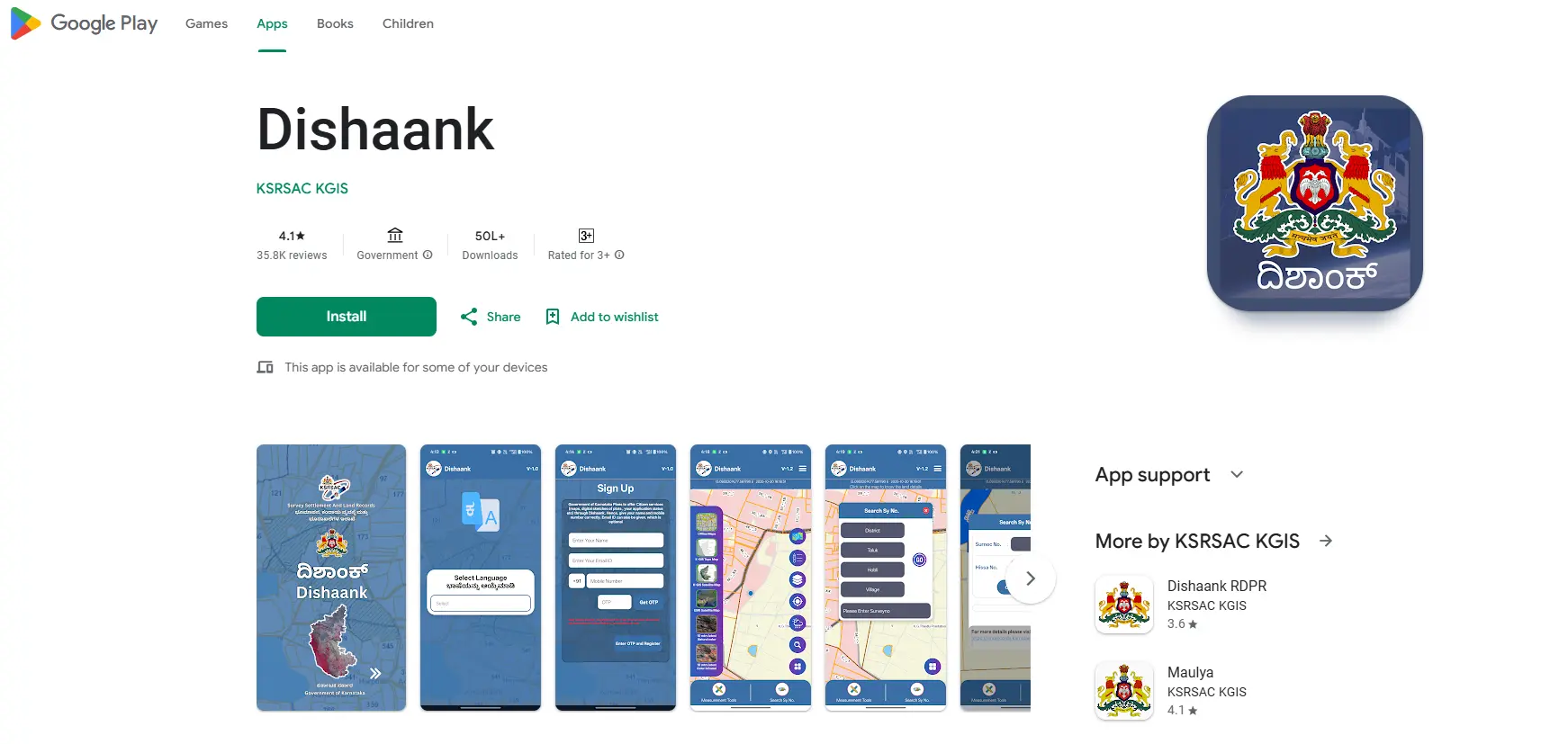
Key Features of the Dishaank App
- GPS-based Survey Number Identification: Shows the survey number of land based on your current location.
- Village & Revenue Maps: Displays village maps with clearly marked survey boundaries.
- Gomala & Government Land Details: Helps identify government land, forest land, and gomala areas.
- Land Boundary Verification: Useful while purchasing land or resolving boundary-related disputes.
- Integrated with Bhoomi Karnataka: Works alongside Bhoomi RTC and Karnataka land records data.
How Farmers Can Use the Dishaank App
- Download the Dishaank App from the Google Play Store.
- Enable GPS / Location services on your mobile phone.
- Stand on the land you want to verify and open the app.
- The app will display the survey number, land type, and boundaries on the map.
Why the Dishaank App Is Important
- Prevents land fraud and boundary disputes
- Helps farmers verify land before buying or selling
- Saves time by avoiding manual survey checks
- Provides accurate, government-backed land information
Note: The Dishaank App is for reference and verification purposes. For legal use such as loans or court matters, farmers must download the digitally signed i-RTC from the Bhoomi portal.
Bhoomi Monitoring Cell (BMC) – Karnataka
The Bhoomi Monitoring Cell (BMC) is an official initiative of the Revenue Department, Government of Karnataka. This state government portal has been developed to provide citizens and farmers with easy access to information and digital services related to Bhoomi land records.
The main objective of the Bhoomi Monitoring Cell is to ensure transparent, accurate, and timely access to Karnataka land records such as RTC (Pahani), mutation details, revenue maps, and other Bhoomi services. It also acts as the official support and monitoring authority for resolving technical issues, data-related problems, and service requests on the Bhoomi portal.
Key Functions of the Bhoomi Monitoring Cell
- Monitoring and maintenance of the Bhoomi land records system
- Providing technical support for RTC, mutation, and i-RTC services
- Addressing data correction and record-related grievances
- Ensuring transparency and accuracy in Karnataka land records
The Bhoomi Monitoring Cell plays a vital role in helping farmers and landowners access reliable land information without unnecessary delays or visits to government offices.
Official Helpdesk & Contact – Bhoomi RTC Karnataka
If you face any technical issues or are unable to access land records online, you can directly contact the Bhoomi Monitoring Cell, the official support authority for the Bhoomi RTC portal.
| Support Type | Contact Details |
|---|---|
| Helpline Numbers | 080-22113255 / 8277864065 / 8277864067 / 8277864068 |
| Email Support | bhoomi@karnataka.gov.in |
| Alternate Email | bmchelpdesk.s@gmail.com |
| Physical Office Address | Bhoomi Monitoring Cell, SSLR Building, K.R. Circle, Bangalore – 560001 |
When Should You Contact the Bhoomi Helpdesk?
- RTC or i-RTC not downloading after payment
- Mutation status not updating
- Survey number or land details missing
- Payment deducted but document not received
- Portal login or OTP issues
Farmer Tip: Always keep your transaction ID / payment reference number handy when contacting the helpdesk. It helps officials resolve issues faster.
Key 2025–2026 Technological & Legal Updates
The ecosystem has evolved with significant reforms to improve security and efficiency:
- Blockchain Integration (2026): Migration to blockchain ensures an immutable history of ownership, making it mathematically impossible to alter records retroactively.
- Jamma Bane Reforms: The Karnataka Land Revenue (Second Amendment) Act, 2025 modernises records in Kodagu, allowing current occupants to be recognised as owners instead of legacy names from the 1600s.
- Registration Fee Hike: As of August 2025, property registration fees in Karnataka have doubled from 1% to 2%.
- Dishaank App: This mobile tool uses GPS to help you identify the survey number of the exact spot where you are standing, preventing boundary fraud.
FAQs
What is Bhoomi RTC (Pahani)?
The RTC (Record of Rights, Tenancy, and Crops), also known as Pahani, is the most critical land document in Karnataka. It provides a comprehensive legal snapshot of a land parcel.
Is a printout from the Bhoomi portal legally valid?
Yes, a digitally signed RTC downloaded from the portal is a legal document compliant with the IT Act.
What should I do if my land records are incorrect?
You should contact the local Tehsildar office. You can track the correction process through the 'Mutation Status' feature on the portal.
Are there charges for viewing RTCs?
Viewing the basic record is often free, but downloading a certified, digitally signed copy usually requires a small government fee.
Conclusion
The Bhoomi RTC portal is more than just a website; it’s a tool for empowerment. By bringing land records to the fingertips of the common man, the Karnataka government has set a benchmark for modern land governance in India. Whether you're a farmer, an investor, or a homeowner, knowing how to navigate this portal is an essential skill in today’s digital age.